
The SBT Retailer Portal Home tab will be the first page you see when logging into the portal. It features widgets that provide insight into account tasks, transactions, wholesale cost data, and more.
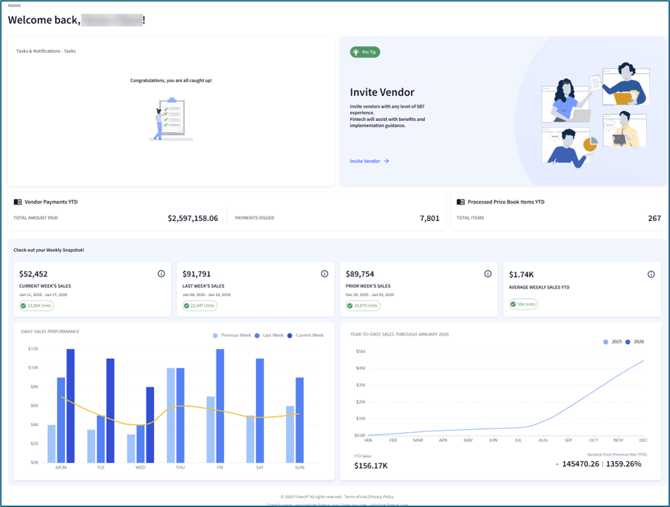
At a glance, you can learn:
- The number of payments sent to vendors and the total amount of all payments.
- Count of price book requests that have been completed in the current year.
- Wholesale costs from the current and previous weeks, as well as a weekly average.
- All transactions that have occurred within the current, last and previous weeks.
- Wholesale costs in the last three years, organized by month.
To learn more, watch the overview video or continue reading below:
Widget Information
Learn more about the widgets and view relevant knowledge base articles below:
|
Widget |
Description |
Article |
|
Tasks |
Action items that need to be managed. This can include approving price book requests, approving payments, account setup tasks, etc. |
- |
|
Pro Tip |
|
|
|
Vendor Payments YTD |
|
How does Sales Summary provide insight into wholesale purchasing costs? |
|
Process Price Book Items YTD |
Count of price book requests that have been posted in the current year. |
|
|
Current Week’s Sales |
Wholesale costs from the start of the current week (Sunday) through today. |
- |
|
Last Week’s Sales |
|
- |
|
Previous Week’s Sales |
Wholesale costs from the Sunday to Saturday 2 weeks prior to the current week. |
- |
|
Average Weekly Sales |
The average wholesale cost from the current, last, and previous week’s sales. Based on costs from the current year. |
Further details in Insights > Sales Overview |
|
Recent Transactions |
|
- |
|
Year to Date Sales |
|
Further details in Insights > Saes Trends |