
Plans
The Plans tab lets you compare the Fintech Portal's subscription options, allowing you to choose the best option that fits your company’s needs.
⚠️ Accounts with a Premium subscription do not have access to Settings > Plans and Billing. For all other account types, only Admins and Super Admins have access to this page. To learn about user roles, click here: User Roles.
There are 5 plan options: FREE, LITE, PRO, Premium, and Premium Plus. New customers and those migrated from the legacy FMS product get a 30-day trial to the Pro subscription. At the trial period’s expiration, your company will downgrade to the Free program. Your company can upgrade anytime.
Here are the main differences between the plans:
The Free Plan (payments only) provides:
- Invoice payments (EFT only)
- 10 days of payment history
- Up to 10 locations
The Lite Plan provides:
- Digital invoices for faster search, greater accuracy and line-item details
- Rapid answers to invoice questions compared to calls or emails
- Vendor contact look-up
- 15 months of payment history
- Invoice payments (EFT only)
- Spend analysis to identify slow-moving products
- Flexible payment options
The Pro Plan provides:
- All the features in the Lite Plan
- Pay invoices ahead of the due date with Early Pay
- Advanced insights and reporting
- Distributor analysis & product assortment review
- Product mapping for General Ledger (GL) integration
- Downloadable reports
- Integration to 200+ back-office systems (additional fees may apply)
- Unlimited users
Review Plans or Upgrade
To review current options or upgrade:
- Go to Settings > Plan or click here to be redirected to the Plans and Billing page. For additional security, you’ll be asked to verify your email and follow further verification steps.
⚠️ This email will expire after 24 hours. Once expired, you will need to return to the portal and repeat the verification process. If you do not receive a verification email, check your spam box or contact our Sales Team.
- Review the options and select the plan that best fits your company. Need advice? Click Get Contacts or call our Sales team at 1-813-288-1980 from 8am to 5pm EST, Monday – Friday.
- Select a bank account if you have more than one payment method, then click Complete Upgrade. Access to the upgraded plan begins immediately. The new billing cycle for the upgrade begins on the 1st of the following month.
If you wish to downgrade, please contact Client Support. A member of the team will contact you about changing your plan.
Billing Activity
View payment records in the Billing Activity tab, including plan charges, subscription fees, credits, reversals, and more. The weekly operational emails you receive will detail when billing invoices are available for review.
⚠️ Only Admins and Super Admins have access to this page. Learn more here: User Roles.
Invoices are organized by month, with the current month expanded to show the most recent charges to your account:
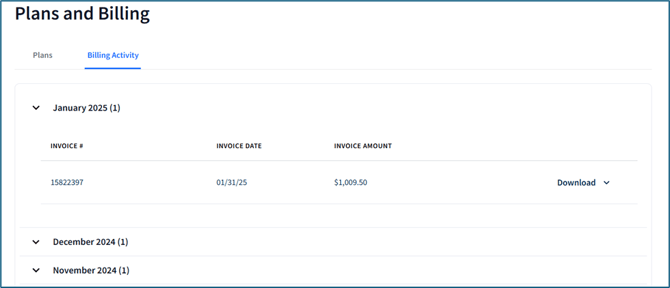
If you have multiple accounts under one company, a Company Name column will be present before the Invoice # column. At the end of a row, click Download to save a copy of the invoice to your computer as a PDF or CSV.