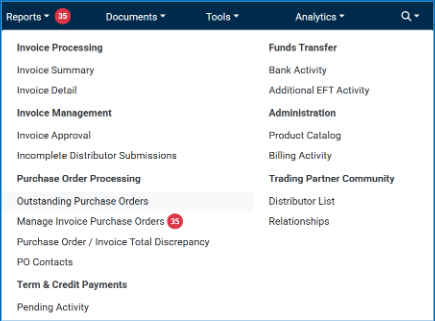
To find a purchase order, first log into the Fintech FMS site, click on Reports and then click Outstanding Purchase Orders.
Monitoring POs
The Outstanding Purchase Order screen serves as the record of all PO’s received by Fintech. To narrow down your search, use one or more of the filter options provided, then click Load Report:
- Company Division (if your company is set configured for divisions)
- Distributor
- Location
- PO Type (Cancellations, Changes, Originals).
- PO Status (Ingested, Sent, Invoiced, Disputed). See below for status definitions.
- Date Range

The result will summarize Total POs and the Total PO Dollar Amount based on your filter options. You can download the data, either as a CSV or printed PDF.
The table provides the following information for each PO:
- Company Division
- Distributor Name
- Your ID for the Distributor
- Your Location ID
- The PO Number
- PO Type (Cancellations, Changes, Originals)
- PO Status
- The date the status was last updated
- Any invoices that have come in for that PO by Invoice #
- The order date of the PO
- The expected delivery date
- The number of line items on the PO
- The total expected dollar amount of the PO
PO Type
This is simply whether the PO is original, updated, or canceled. Specifically, it means the following:
|
PO Type |
Purpose |
Effect |
|
Original |
Create a new order |
Starts the PO lifecycle |
|
Change |
Modify an existing PO |
Updates the original order |
|
Cancellation |
Void an existing PO |
Stops fulfillment |
PO Status
Status tells you the lifecycle stage of a PO. The stages and their definitions are:
Ingested
Fintech has received and stored your PO in our system. If you do not see your PO in the Outstanding Purchase Orders page then it has not been ingested yet.
Sent (requires retailers to use the PO syndication service)
A PO will be in the Sent status when the order has been transmitted via email, EDI, or both. If you do not use PO syndication, this status does not apply.
Acknowledged (requires retailers to activate the Acknowledge PO in PO Contacts)
The status will be updated to acknowledged when a distributor clicks the Acknowledge PO button. The distributor acknowledges a PO from a button in a PO email has sent acknowledgement via EDI. If you do not use PO syndication, this status does not apply.
Invoiced (for all OrderSource retailers using either PO syndication or PO validation)
An invoice received from a distributor that correctly matches the PO number sent by you.
This status depends on the distributor providing a correct PO number on the invoice as well. Invoices with missing or incorrect PO numbers will update to Invoiced once corrected by the retailer and approved. See Managing Invoices and Purchase Orders.
Disputed
For invoices is received from a distributor with a PO number that matches one submitted by you with or without leveraging the Invalid PO# or Suggested PO# processes. If you submit an Invoice Inquiry or Credit Request for that invoice, the PO will be updated to a disputed status to ensure that you can keep track of your questionable invoices.
Viewing PO Details
To view the details of any purchase order, simply click the PO Number link in the grid on the Outstanding Purchase Orders screen
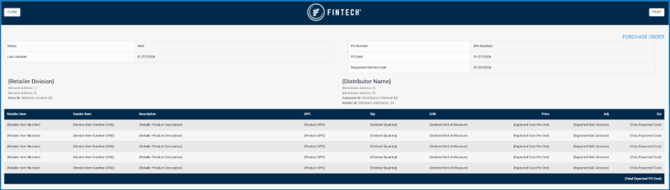
You will be taken to a new tab that will contain the relevant header and detail information for the PO including:
-
PO Number
-
The order date of the PO
-
The expected delivery date
-
PO Status
-
The date the status was last updated
-
Your division that placed the order
- The delivery address
- Your location ID
- The distributor fulfilling the order
- The distributor’s address
- The distributor’s customer ID for that location
- Your internal ID for that distributor
Detail Level:
- Your internal product ID if applicable
- The distributor’s Vendor Item Number (VIN) if applicable
- Your internal description of the product
- The product UPC – If applicable
- The ordered quantity for that product
- The ordered unit of measure
- Your expected cost for each unit
- Any expected services, allowances, and charges values
- The total expected cost for that line item