
If you’re a distributor or retailer user with an account tied to several companies within your organization, secure login lets you access all companies you are assigned to using an email address and a password rather than separate credentials for each company.
With secure login, you can select which company’s data to view after signing in and switch between companies at any time without signing out of your account.
Secure Login Migration
To complete the secure login migration, either:
- From the secure login email - Check for an email with the title "Action Required: Your Fintech Login is Changing" and click the link in the email. The email explains the security changes and lists the companies that will be linked to your email address. Follow the prompts to create your new password.
- From the Legacy portal - Sign in with your current username and password, then follow the prompts to migrate to an email-based login and create a new password.
For all future logins, you will use your email address and password to sign into Legacy FMS.
Accessing Companies
⚠️ If you still sign in to the portal with a username instead of an email address, the "Select Company" screen and Switch Company option will not be available until you complete the secure login migration.
Upon logging into your account with your email address and password, you'll see the "Select Company" screen after signing in: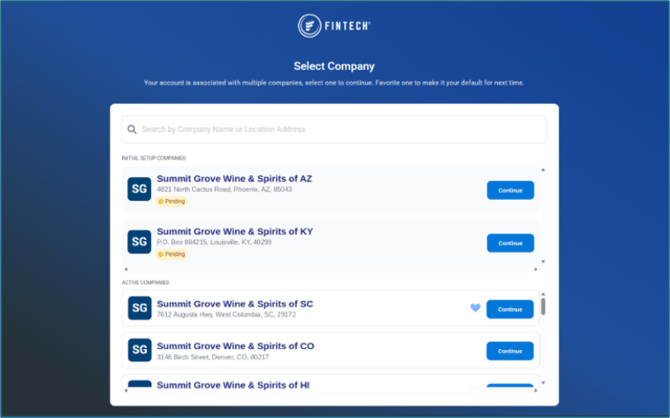
From here, either:
-
Access data - Click the Continue button on a row to view that company's data.
-
Select a favorite company (optional) - Hover over a company’s row and click the heart icon to set it as your favorite. Future sign-ins will skip the "Select Company" screen and open that company automatically. This can be unselected or changed at any time.
💡 When on the "Select Company" screen, clicking the Continue button on a different company's row will not change your favorite company.
To view another company after selecting one from the "Select Company" screen, click your name in the top right corner of the screen, and select Switch Company:
